Showing posts with label pairtree. Show all posts

Thursday, 25 March 2010

Curating content from one repository to put into another

First you need a little code that I've written:

sudo easy_install recordsilo oaipmhscraper

(This should install all the dependencies for the following)

To harvest some OAI-PMH records from say... http://eprints.soton.ac.uk/perl/oai2 :

First, take a look at the Identify page for the OAI-PMH endpoint: http://eprints.soton.ac.uk/perl/oai2?verb=Identify

The example identifier indicates that the record identifiers start with: "oai:eprints.soton.ac.uk:" - we'll need this in a bit. Maybe not need, but it'll make the local storage more... elegant?

Go to a nice clean directory, with enough storage to handle whatever you want to harvest.

Start a python commandline:

>>> from oaipmhscraper import OAIPMHScraper

---> NB OAIPMHScraper(storage_dir, base_oai_url, identifier_uri_prefix)

>>> oaipmh = OAIPMHScraper("myrepo",
"http://eprints.soton.ac.uk/perl/oai2",
"oai:eprints.soton.ac.uk:")

Let's have a look at what could be found out about the OAI-PMH endpoint then:

>>> oaipmh.state

{'lastidentified': '2010-03-25T15:57:15.670552', 'identify': {'deletedRecord': 'persistent', 'compression': [], 'granularity': 'YYYY-MM-DD', 'baseURL': 'http://eprints.soton.ac.uk/perl/oai2', 'adminEmails': ['mailto:eprints@soton.ac.uk'], 'descriptions': ['........'], 'protocolVersion': '2.0', 'repositoryName': 'e-Prints Soton', 'earliestDatestamp': '0001-01-01 00:00:00'}}

>>> oaipmh.getMetadataPrefixes()

{'oai_dc': ('http://www.openarchives.org/OAI/2.0/oai_dc.xsd', 'http://www.openarchives.org/OAI/2.0/oai_dc/'), 'uketd_dc': ('http://naca.central.cranfield.ac.uk/ethos-oai/2.0/uketd_dc.xsd', 'http://naca.central.cranfield.ac.uk/ethos-oai/2.0/')}

Let's grab all the oai_dc from all the objects:

>>> oaipmh.getRecords('oai_dc')
...

Go make a cup of coffee or tea.... you'll get lots of stuff like:

INFO:OAIPMH Harvester:New object: oai:eprints.soton.ac.uk:1267 found with datestamp 2004-04-27T00:00:00 - storing.
2010-03-25 16:01:11,807 - OAIPMH Harvester - INFO - New object: oai:eprints.soton.ac.uk:1268 found with datestamp 2005-04-22T00:00:00 - storing.
INFO:OAIPMH Harvester:New object: oai:eprints.soton.ac.uk:1268 found with datestamp 2005-04-22T00:00:00 - storing.
2010-03-25 16:01:11,813 - OAIPMH Harvester - INFO - New object: oai:eprints.soton.ac.uk:1269 found with datestamp 2004-04-07T00:00:00 - storing.
INFO:OAIPMH Harvester:New object: oai:eprints.soton.ac.uk:1269 found with datestamp 2004-04-07T00:00:00 - storing.
2010-03-25 16:01:11,819 - OAIPMH Harvester - INFO - New object: oai:eprints.soton.ac.uk:1270 found with datestamp 2004-04-07T00:00:00 - storing.
INFO:OAIPMH Harvester:New object: oai:eprints.soton.ac.uk:1270 found with datestamp 2004-04-07T00:00:00 - storing.
2010-03-25 16:01:11,824 - OAIPMH Harvester - INFO - New object: oai:eprints.soton.ac.uk:1271 found with datestamp 2004-04-14T00:00:00 - storing.

...

My advice is to hop to a different terminal window and start to poke around with the content you are getting. The underlying store is a take on the CDL's Pairtree microspec (pairtree being a minimalist specification for how to structure the access to object-orientated items on a hierarchical filesystem) This model on top of pairtree I've called a Silo (in the RecordSilo library I've written) and constitutes a basic object model, where each object has a persistent JSON state (r/w-able) and can store any file or file in a subdirectory. It has crude object-level versioning, rather than file-versioning, so you can clone one version, delete/alter/add to it to create a second, curated version for reuse elsewhere without affecting the original.

What makes pairtree attractive is that the files themselves are not altered in form, so normal posix tools can be used on the files without unwrapping, depacking, etc.

Let's have a look around at what's been harvested so far into the "myrepo" silo:

>>> from recordsilo import Silo
>>> s = Silo("myrepo")
>>> s.state
{'storage_dir': 'myrepo', 'identifier_uri_prefix': 'oai:eprints.soton.ac.uk:', 'uri_base': 'oai:eprints.soton.ac.uk:', 'base_oai_url': 'http://eprints.soton.ac.uk/perl/oai2'}'}

>>> len(s) # NB this can be a time-consuming operation
1100
>>> len(s)
1200

Now let's look at a record: I'm sure I saw '6102' whizz past as it was harvesting...

>>> obj = s.get_item("oai:eprints.soton.ac.uk:6102")

>>> obj
{'files': {'1': ['oai_dc']}, 'subdir': {'1': []}, 'versions': ['1'], 'date': '2004-06-24T00:00:00', 'currentversion': '1', 'metadata_files': {'1': ['oai_dc']}, 'item_id': 'oai:eprints.soton.ac.uk:6102', 'version_dates': {'1': '2004-06-24T00:00:00'}, 'metadata': {'identifier': 'oai:eprints.soton.ac.uk:6102', 'firstSeen': '2004-06-24T00:00:00', 'setSpec': ['7374617475733D707562', '7375626A656374733D51:5148:5148333031', '7375626A656374733D47:4743', '74797065733D61727469636C65', '67726F75703D756F732D686B']}}

>>> obj.files
['oai_dc']
>>> obj.versions
['1']
>>> obj.clone_version("1","workingcopy")
'workingcopy'
>>> obj.versions
['1', 'workingcopy']
>>> obj.currentversion
'workingcopy'
>>> obj.set_version_cursor("1")
True
>>> obj.set_version_cursor("workingcopy")
True
>>> obj.files
['oai_dc']
>>> with obj.get_stream("oai_dc") as oai_dc_xml:
... print oai_dc_xml.read()
...
<metadata xmlns="http://www.openarchives.org/OAI/2.0/" xmlns:xsi="http://www.w3.org/2001/XMLSchema-instance">
<oai_dc:dc xmlns:xsi="http://www.w3.org/2001/XMLSchema-instance" xmlns:oai_dc="http://www.openarchives.org/OAI/2.0/oai_dc/" xmlns:dc="http://purl.org/dc/elements/1.1/" xsi:schemaLocation="http://www.openarchives.org/OAI/2.0/oai_dc/ http://www.openarchives.org/OAI/2.0/oai_dc.xsd">
<dc:title>Population biology of Hirondellea sp. nov. (Amphipoda: Gammaridea: Lysianassoidea) from the Atacama Trench (south-east Pacific Ocean)</dc:title>
<dc:creator>Perrone, F.M.</dc:creator>
<dc:creator>Dell'Anno, A.</dc:creator>
<dc:creator>Danovaro, R.</dc:creator>
<dc:creator>Groce, N.D.</dc:creator>
<dc:creator>Thurston, M.H.</dc:creator>
<dc:subject>QH301 Biology</dc:subject>
<dc:subject>GC Oceanography</dc:subject>
<dc:description/>
<dc:publisher/>
<dc:date>2002</dc:date>
<dc:type>Article</dc:type>
<dc:type>PeerReviewed</dc:type>
<dc:identifier>http://eprints.soton.ac.uk/6102/</dc:identifier></oai_dc:dc></metadata>

You can add bytestreams as strings:

>>> obj.put_stream("foo.txt", "Some random text!")

or as file-like objects:

>>> with open("README", "r") as readmefile:
... obj.put_stream("README", readmefile)
...
>>> obj.files
['oai_dc', 'foo.txt', 'README']
>>> obj.set_version_cursor("1")
True
>>> obj.files
['oai_dc']

This isn't the easiest way to browse or poke around the files. It would be nice to see these through a web UI of some kind:

Grab the basic UI code from http://github.com/benosteen/siloserver

(You'll need to install web.py and Mako: sudo easy_install mako web.py)

Then edit the silodirectory_conf.py file to point to the location of the Silo - if the directory structure looks like the following:

myrepo
|
--- Silo directory stuff...
SiloServer
|
- dropbox.py
etc

You need to change data_dir to "../myrepo" and then you can start the server by running 'python dropbox.py'

Point a browser at http://localhost:8080/ and wait a while - that start page loads *every* object in the Silo.
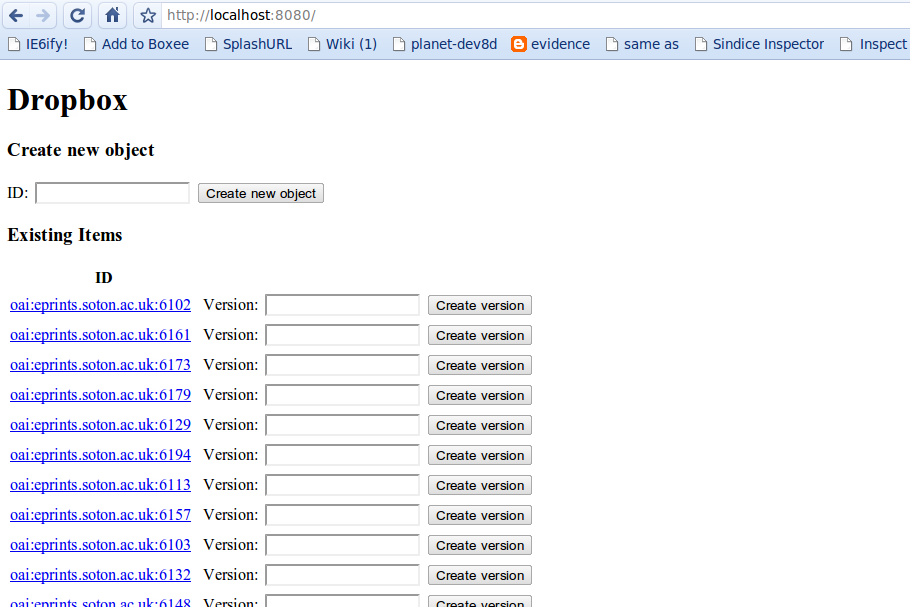
And let's revisit our altered record, at http://localhost:8080/oai:eprints.soton.ac.uk:6102
So, from this point, I can curate the records as I wish, add files to each item - perhaps licences, PREMIS files, etc - and then push them onto another repository, such as Fedora.

Thursday, 11 February 2010

My swiss army toolkit for distributed/multiprocessing systems

My first confession - I avoid 'threading' and shared memory. Avoid it like the plague, not because I cannot do it but because it can be a complete pain to build and maintain relative to the alternatives.

I am very much pro multiprocessing versus multithreading - obviously, there are times when threading is by far the best choice, but I've found multiprocessing for the most part it to be quicker, easier and far easier to log, manage and debug than multithreading.

So, what do I mean by a 'multiprocessing' system? (just to be clear)

A multiprocessing system consists of many concurrently running processes running on one or more machines, and contains some means to distribute messages and persist data between these processes.

This does not mean that the individual processes cannot multithread themselves, it is just that each process handles a small, well-defined aspect of the system (paralleling the unix commandline tool idiom).

Tools for multiprocess management:

  • Redis - data structure server, providing atomic operations on integers, lists, sets, and sorted lists.
  • RabbitMQ - messaging server, based on the AMQP spec. IMO Much cleaner, easier to manage, more flexible and more reliable than all the JMS systems I've used.
  • Supervisor - a battle-tested, process manager that can be operated via XML-RPC or HTTP. Enables live control and status of your processes.
Redis has become my swiss army knife of data munging - a store that persists data and which has some very useful atomic operations, such as integer incrementing, list manipulations and very fast set operations. I've also used it for some quick-n-dirty process orchestrations (which is how I've used it in the example that ends this post.)

I've also used it for usage statistic parsing and characterisation of miscellaneous XML files too!

RabbitMQ - a dependable, fast message server which I am primarily using as a buffer for asynchronous operations and task distribution. More boilerplate to use than, say Redis, but by far more suited for that sort of thing.

Supervisord - I've been told that the ruby project 'god' is similar to this - I really have found it very useful, especially on those systems I run remotely. An HTML page to control processes and view logs and stats? what's not to like!

Now for a little illustration of a simple multiprocessing solution - in fact, this blog post far, far outweighs the code written and perhaps even overeggs the simple nature of the problem. I typically wouldn't use supervisor for a simple task like the following, but it seems a suitable example to show how to work it.

The ability to asynchronously deliver messages, updates and tasks between your processes is a real boon - it enables quick solutions to normally vexing or time-consuming problems. For example, let's look at a trivial problem of how to harvest the content from a repository with an OAI-PMH service:

A possible solution needs:
  • a process to communicate with the OAI-PMH service to gain the list of identifiers for the items in the repository (with the ability to update itself at a later time). Including the ability to find the serialised form of the full metadata for the item, if it cannot be gotten from the OAI-PMH service (eg Eprints3 XML isn't often included in the OAI-PMH service, but can be retrieved from the Export function.),
  • a process that simply downloads files to a point on the disc,
  • and a service that allows process one to queue jobs for process 2 to download - in this case Redis.
I told you it would be trivial :)

Installing Redis: (See http://code.google.com/p/redis/wiki/QuickStart for fuller instructions)
  • sudo apt-get install build-essential python-dev python-setuptools [make sure you can build and use easy_install - here shown for debian/ubuntu/etc]
  • sudo easy_install supervisor
  • mkdir oaipmh_directory # A directory to contain all the bits you need
  • cd oaipmh_directory
Create a supervisor configuration for the task at hand and save it as supervisord.conf.
[program:oaipmhgrabber]
autorestart = false
numprocs = 1
autostart = false
redirect_stderr = True
stopwaitsecs = 10
startsecs = 10
priority = 10
command = python harvest.py
startretries = 3
stdout_logfile = workerlogs/harvest.log

[program:downloader]
autorestart = true
numprocs = 1
autostart = false
redirect_stderr = True
stopwaitsecs = 10
startsecs = 10
priority = 999
command = oaipmh_file_downloader q:download_list
startretries = 3
stdout_logfile = workerlogs/download.log

[program:redis]
autorestart = true
numprocs = 1
autostart = true
redirect_stderr = True
stopwaitsecs = 10
startsecs = 10
priority = 999
command = path/to/the/redis-server
startretries = 3
stdout_logfile = workerlogs/redis.log

[unix_http_server]
file = /tmp/supervisor.sock

[supervisord]
minfds = 1024
minprocs = 200
loglevel = info
logfile = /tmp/supervisord.log
logfile_maxbytes = 50MB
nodaemon = false
pidfile = /tmp/supervisord.pid
logfile_backups = 10

[supervisorctl]
serverurl = unix:///tmp/supervisor.sock

[rpcinterface:supervisor]
supervisor.rpcinterface_factory = supervisor.rpcinterface:make_main_rpcinterface

[inet_http_server]
username = guest
password = mypassword
port = 127.0.0.1:9001

This has a lot of boilerplate on it, so let's go through it, section by section:

[program:redis] - this controls the redis program. You will need to change the path to the redis server to wherever it was built on your system - eg ~/redis-1.2.1/redis-server

[program:oaipmhgrabber] and [program:downloader] - these set up the processes, look at the 'command' key for the command that is run for them eg downloader has "oaipmh_file_downloader q:download_list" - The OAIPMHScraper package adds in the script, 'q:download_list' is the redis-based list that the download tasks appear on. NB we haven't written harvest.py yet - don't worry!

NB very important that autorestart=false in [program:oaipmhgrabber] - if it didn't, it would eternally repeat - on and on and on - harvesting!

Supervisor boilerplate: [unix_http_server], [supervisord], [supervisorctl]

RPC interface control [rpcinterface:supervisor]

HTTP interface control - [inet_http_server] - which includes importantly the username and password to log in to the control panel!

Now, create the log directory:

mkdir workerlogs

Let's now write 'harvest.py': PLEASE use a different OAI2 endpoint url!
#!/usr/bin/env python

from oaipmhscraper import Eprints3Harvester

o = Eprints3Harvester("repo", base_oai_url="http://eprints.maths.ox.ac.uk/cgi/oai2/")

o.getRecords(metadataPrefix="XML",
template="%(pid)s/%(prefix)s/mieprints-eprint-%(pid)s.xml")
[Note there is a base OAIPMHScraper class, but this simply goes and gets the metadata or Identifiers for a given endpoint and stores whatever XML metadata it gets into a store. The Eprints3 harvester gets the files as well, or tries to.]

You may have to change the template for other eprints repositories - the above template would result in the following for item 774:

"http://eprints.maths.ox.ac.uk/cgi/export/774/XML/mieprints-eprint-774.xml"

YMMV for other repositories of course, so you can rewrite this template accordingly.

Your directory should look like this:

--> harvest.py supervisord.conf workerlogs/

Let's start the supervisor to make the configuration is correct:

[---] $ supervisord -c supervisord.conf
[---] $

Now open http://localhost:9001/ - it should look like the following:


Click on the 'redis' name to see the logfile that this is generating - you'll want to see lines like:

11 Feb 13:34:32 . 0 clients connected (0 slaves), 2517 bytes in use, 0 shared objects

Let's start the harvest :)

Click on 'start' for the oaipmh grabber process and wait - in the configuration file, we told it to wait for the process to stay up for 10 seconds before reporting that it was running, so it should take about that long for the page to refresh.

Now, let's see what it is putting onto the queue, before we start the download process (see, easy to debug!)

python
>>> from redis import Redis
>>> r = Redis()
>>> r.keys("*")
[u'q:download_list']
>>> r.llen("q:download_list")
351
>>> r.llen("q:download_list")
361
>>> r.llen("q:download_list")
370
>>> # Still accruing things to download as we speak...
>>> r.lrange("q:download_list", 0,0)
[u'{"url": "http://eprints.maths.ox.ac.uk/cgi/export/774/XML/mieprints-eprint-774.xml", "filename": "XML", "pid": "oai:generic.eprints.org:774", "silo": "repo"}']

Now, let's switch on the downloader and work on those messages - go back to http://localhost:9001 and start the downloader. Click on the downloader name when the page refreshes to get a 'tail' of it's logfile in the browser.

You should get something like the following:
INFO:CombineHarvester File downloader:Starting download of XML (from http://eprints.maths.ox.ac.uk/cgi/export/370/XML/mieprints-eprint-370.xml) to object oai:generic.eprints.org:370
2010-02-11 13:43:51,284 - CombineHarvester File downloader - INFO - Download completed in 0 seconds
INFO:CombineHarvester File downloader:Download completed in 0 seconds
2010-02-11 13:43:51,285 - CombineHarvester File downloader - INFO - Saving to Silo repo
INFO:CombineHarvester File downloader:Saving to Silo repo
2010-02-11 13:43:51,287 - CombineHarvester File downloader - INFO - Starting download of XML (from http://eprints.maths.ox.ac.uk/cgi/export/371/XML/mieprints-eprint-371.xml) to object oai:generic.eprints.org:371
INFO:CombineHarvester File downloader:Starting download of XML (from http://eprints.maths.ox.ac.uk/cgi/export/371/XML/mieprints-eprint-371.xml) to object oai:generic.eprints.org:371
So, that will go about and download all the XML (Eprints3 XML) for each item it found in the repository. (I haven't put in much to stop dupe downloads etc. - exercise for the reader ;))

How about we try to download the files for each item too? I just so happens I've included a little Eprints3 XML parser and method for queuing up the files for download 'reprocessRecords' - let's use this to download the files now - save as download_files.py

#!/usr/bin/env python

from oaipmhscraper import Eprints3Harvester

o = Eprints3Harvester("repo", base_oai_url="http://eprints.maths.ox.ac.uk/cgi/oai2/")

o.reprocessRecords()
Add this process to the top of the supervisord.conf file:
[program:queuefilesfordownload]
autorestart = false
numprocs = 1
autostart = false
redirect_stderr = True
stopwaitsecs = 10
startsecs = 10
priority = 999
command = python download_files.py
startretries = 3
stdout_logfile = workerlogs/download_files.log

Now, to demonstrate the commandline supervisor controller:
[--] $ supervisorctl
$ supervisorctl
downloader RUNNING pid 20750, uptime 0:15:41
oaipmhgrabber STOPPED Feb 11 01:58 PM
redis RUNNING pid 16291, uptime 0:25:31
supervisor> shutdown
Really shut the remote supervisord process down y/N? y
Shut down
supervisor>
(Press Ctrl+D to leave this terminal)

Now restart the supervisor:
[--] $ supervisord -c supervisord.conf

And refresh http://localhost:9001/

[NB in the following picture, I reran oaipmhgrabber, so you could see what the status of a normally exiting process looks like]


Now, switch on the reprocess record worker and tail -f the downloader if you want to watch it work :)

What's a RecordSilo? (aka How things are stored in the example)

This class is based on CDL's spec for Pairtree object storage - each object contains a JSON manifest and is made up of object-level versions. But, it is easier to understand if you have some kind of GUI to poke around with, so I quickly wrote the following dropbox.py server for that end:

Grab the dropbox code and templates from http://github.com/benosteen/SiloServer - unpack it into the same directory as you are in now.

so that:

[--] $ ls
download_files.py dropbox.py dump.rdb harvest.py repo supervisord.conf templates workerlogs

Edit dropbox.py and change the data_dir to equal your repo directory name - in this case, just "repo"

(Make sure you have mako and web.py installed too! sudo easy_install mako web.py)

then:

$ python dropbox.py
http://0.0.0.0:8080/

Go to http://localhost:8080/ to then see all your objects! This page opens them all, so could take a while :)


(I did this on my work computer and may have not put in some dependencies, etc but it worked for me. Let me know if it doesn't in the comments)